
Note
Go to the end to download the full example code.
Back and Forth#
author: OpenTPS team
This example shows how two different python environements can be used together. A parent script launches a child script which uses a different python environement but shares the same image data. It is possible to pass commands back and forth between the two scripts. The child script in this example simulates the use of an AI model. The first command passed to the child script is to initialise the model (the neural network structure is created and its weights are loaded for example). Then, later in the parent script, another command is passed to the child script to use the AI model, multiple times in a row if necessary.
Important to note: the code executed in the child script must end with a print to send a response, else the script is stuck waiting for the response
Key features: - Use of multiple python envs in communicating scripts. - Share RAM memory space between 2 scripts without the need to save and load data on/from hard drives. - The possibility to initialise first, then later in the parent script, use the AI model.
running time: ~ 5 minutes
Setting up the environment in google collab#
import sys
if "google.colab" in sys.modules:
    from IPython import get_ipython
    get_ipython().system('git clone https://gitlab.com/openmcsquare/opentps.git')
    get_ipython().system('pip install ./opentps')

    import opentps
imports
import matplotlib.pyplot as plt
import numpy as np
import math
from multiprocessing import shared_memory
from subprocess import Popen, PIPE
from pathlib import Path
import the needed opentps.core packages
from opentps.core.data.images import CTImage
from opentps.core.data.images import ROIMask
Synthetic 4DCT generation function#
def createSynthetic3DCT(diaphragmPos = 20, targetPos = [50, 100, 35], spacing=[1, 1, 2], returnTumorMask = False):
    # GENERATE SYNTHETIC CT IMAGE
    # background
    im = np.full((170, 170, 100), -1000)
    im[20:150, 70:130, :] = 0
    # left lung
    im[30:70, 80:120, diaphragmPos:] = -800
    # right lung
    im[100:140, 80:120, diaphragmPos:] = -800
    # target
    im[targetPos[0]-5:targetPos[0]+5, targetPos[1]-5:targetPos[1]+5, targetPos[2]-5:targetPos[2]+5] = 0
    # vertebral column
    im[80:90, 95:105, :] = 800
    # rib
    im[22:26, 90:110, 46:50] = 800
    # couch
    im[:, 130:135, :] = 100
    ct = CTImage(imageArray=im, name='fixed', origin=[0, 0, 0], spacing=spacing)

    if returnTumorMask:
        mask = np.full((170, 170, 100), 0)
        mask[targetPos[0]-5:targetPos[0]+5, targetPos[1]-5:targetPos[1]+5, targetPos[2]-5:targetPos[2]+5] = 1
        roi = ROIMask(imageArray=mask, origin=[0, 0, 0], spacing=spacing)

        return ct, roi

    else:
        return ct
Set the child script environnement path and child scrip file path
childEnvPath = sys.executable  # absolute path to current python
childScriptPath = str(Path.cwd() / "backAndForthChild.py")
Create test image to share between scripts
ct = createSynthetic3DCT()
sliceToShow = 100
Initialize shared memory and copy image array to this space
print(ct.imageArray.shape) ## These must be either passed to the child script as arguments or fixed and known
print(ct.imageArray.dtype) ## These must be either passed to the child script as arguments or fixed and known
print(ct.imageArray.nbytes) ## These must be either passed to the child script as arguments or fixed and known
shm = shared_memory.SharedMemory(create=True, size=ct.imageArray.nbytes, name='sharedArray')
sharedTestArray = np.ndarray(ct.imageArray.shape, dtype=ct.imageArray.dtype, buffer=shm.buf)
sharedTestArray[:] = ct.imageArray[:]
(170, 170, 100)
int64
23120000
# Plot initial image
plt.figure()
plt.title("Before initialize")
plt.imshow(sharedTestArray[:, sliceToShow, :])
plt.show()

Launch child process
process = Popen([childEnvPath, childScriptPath],
                stdin=PIPE, stdout=PIPE, encoding='utf-8', text=True)
Send the command ‘init’ to second process
process.stdin.write('init' + '\n')
process.stdin.flush()
Get the response from the second script
response = process.stdout.readline().strip()
print(f'Back in script 1 after init command: Response: {response}')

print('Do something else in script 1')
Back in script 1 after init command: Response: Initialize AI Model. testVariable = 0
Do something else in script 1
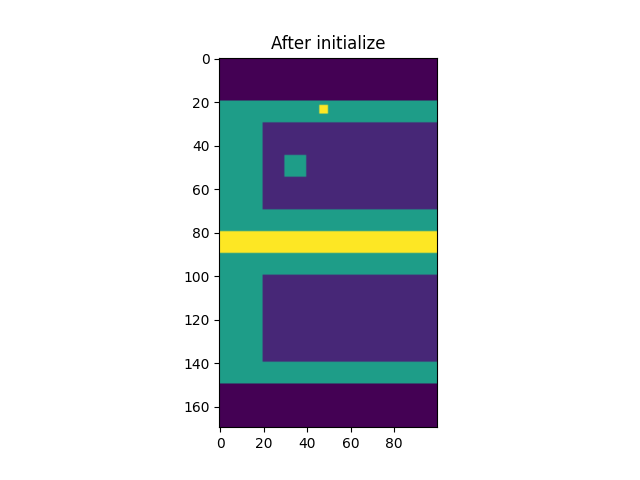
Plot image after init command
ct.imageArray[:] = sharedTestArray[:]
plt.figure()
plt.title("After initialize")
plt.imshow(ct.imageArray[:, sliceToShow, :])
plt.show()

for i in range(3):

    ## Send command 'processImage'
    process.stdin.write('processImage' + '\n')
    process.stdin.flush()

    ## Get the response from the second script
    response = process.stdout.readline().strip()
    print(f'Back in script 1 after command "processImage": Response: {response}')

    ## Plot image after process image command
    ct.imageArray[:] = sharedTestArray[:]
    plt.figure()
    plt.title("After process image")
    plt.imshow(ct.imageArray[:, sliceToShow, :])
    plt.show()

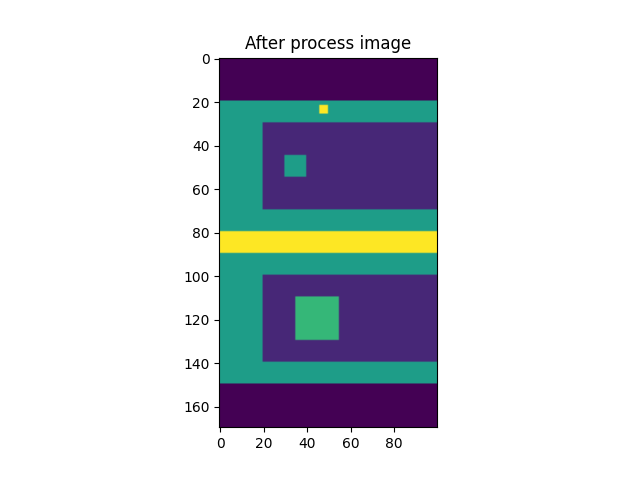
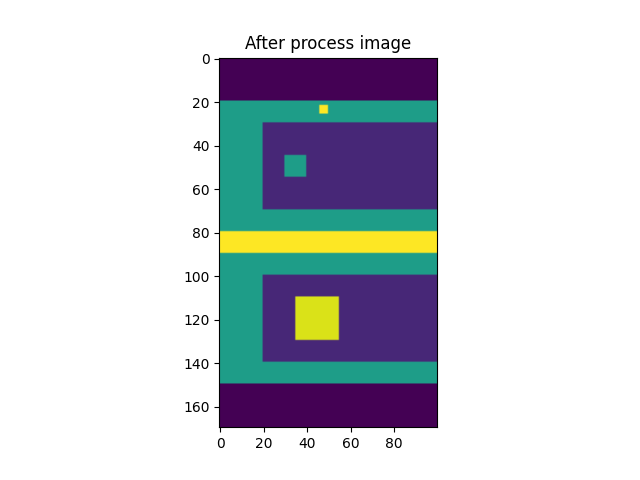
Back in script 1 after command "processImage": Response: Executing processImage of AI Model. testVariable = 1
Back in script 1 after command "processImage": Response: Executing processImage of AI Model. testVariable = 2
Back in script 1 after command "processImage": Response: Executing processImage of AI Model. testVariable = 3
Close the communication
process.stdin.close()
process.stdout.close()
Close the shared memory
shm.close()
try:
    shm.unlink()
except FileNotFoundError:
    print("Shared memory already unlinked, skipping.")

print('End of script 1')
End of script 1
Total running time of the script: (0 minutes 0.433 seconds)