
Note
Go to the end to download the full example code.
Beamlet Free Optimization#
author: OpenTPS team
This example will present the basis of beamlet optimization with openTPS core.
running time: ~ 15 minutes
Setting up the environment in google collab#
import sys
if "google.colab" in sys.modules:
    from IPython import get_ipython
    get_ipython().system('git clone https://gitlab.com/openmcsquare/opentps.git')
    get_ipython().system('pip install ./opentps')

    import opentps
imports
import numpy as np
import os
from matplotlib import pyplot as plt
import the needed opentps.core packages
from opentps.core.data.images import CTImage
from opentps.core.data.images import ROIMask
from opentps.core.data.plan import ObjectivesList
from opentps.core.data.plan._protonPlanDesign import ProtonPlanDesign
from opentps.core.data import DVH
from opentps.core.data import Patient
from opentps.core.io import mcsquareIO
from opentps.core.io.scannerReader import readScanner
from opentps.core.processing.doseCalculation.doseCalculationConfig import DoseCalculationConfig
from opentps.core.processing.doseCalculation.protons.mcsquareDoseCalculator import MCsquareDoseCalculator
from opentps.core.processing.imageProcessing.resampler3D import resampleImage3DOnImage3D
import opentps.core.processing.planOptimization.objectives.dosimetricObjectives as doseObj
Output path#
output_path = 'Output'
if not os.path.exists(output_path):
    os.makedirs(output_path)
Generic CT creation#
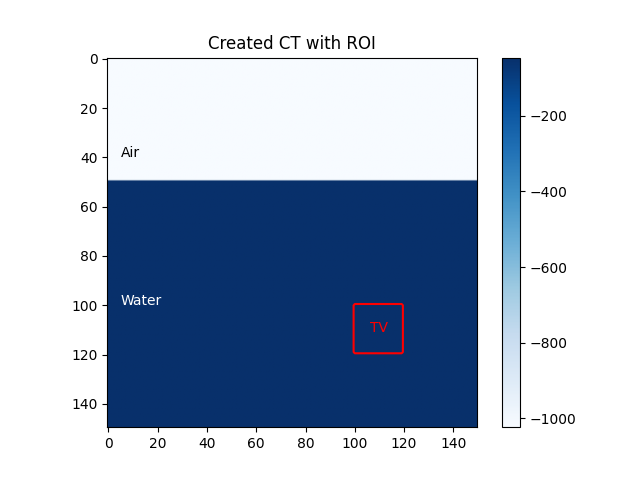
we will first create a generic CT of a box fill with water and air
#calibratioin of the CT
ctCalibration = readScanner(DoseCalculationConfig().scannerFolder)
bdl = mcsquareIO.readBDL(DoseCalculationConfig().bdlFile)

#creation of the patient object
patient = Patient()
patient.name = 'Patient'

#size of the 3D box
ctSize = 150

#creation of the CTImage object
ct = CTImage()
ct.name = 'CT'
ct.patient = patient

huAir = -1024. #Hounsfield unit of water
huWater = ctCalibration.convertRSP2HU(1.) #convert a stopping power of 1. to HU units
data = huAir * np.ones((ctSize, ctSize, ctSize))
data[:, 50:, :] = huWater
ct.imageArray = data #the CT generic image is created
Region of interest#
we will now create a region of interest which is a small 3D box of size 20*20*20
roi = ROIMask()
roi.patient = patient
roi.name = 'TV'
roi.color = (255, 0, 0) # red
data = np.zeros((ctSize, ctSize, ctSize)).astype(bool)
data[100:120, 100:120, 100:120] = True
roi.imageArray = data

body = roi.copy()
body.name = 'body'
body.dilateMask(20)
body.imageArray = np.logical_xor(body.imageArray, roi.imageArray).astype(bool)

image = plt.imshow(ct.imageArray[110,:,:],cmap='Blues')
plt.colorbar(image)
plt.contour(roi.imageArray[110,:,:],colors="red")
plt.title("Created CT with ROI")
plt.text(5,40,"Air",color= 'black')
plt.text(5,100,"Water",color = 'white')
plt.text(106,111,"TV",color ='red')
plt.savefig(os.path.join(output_path,'beamFree1.png'),format = 'png')
plt.show()
Configuration of Mcsquare#
To configure the MCsquare calculator we need to calibrate it with the CT calibration obtained above
mc2 = MCsquareDoseCalculator()
mc2.beamModel = bdl
mc2.ctCalibration = ctCalibration
mc2.nbPrimaries = 1e7
Plan Creation#
We will now create a plan and set objectives for the optimization and set a goal of 20Gy to the target
# Design plan

beamNames = ["Beam1"]
gantryAngles = [0.]
couchAngles = [0.]

# Generate new plan

planDesign = ProtonPlanDesign() #create a new plan
planDesign.ct = ct
planDesign.gantryAngles = gantryAngles
planDesign.beamNames = beamNames
planDesign.couchAngles = couchAngles
planDesign.calibration = ctCalibration
planDesign.spotSpacing = 3.0
planDesign.layerSpacing = 3.0
planDesign.targetMargin = 1.0
# needs to be called prior to spot placement
planDesign.defineTargetMaskAndPrescription(target = roi, targetPrescription = 20.)


plan = planDesign.buildPlan()  # Spot placement
plan.PlanName = "NewPlan"

# plan.planDesign.objectives.addObjective(doseObj.DMax(body,5, weight=1.0))

plan.planDesign.objectives.addObjective(doseObj.DMax(roi, 20, weight=10.0))
plan.planDesign.objectives.addObjective(doseObj.DMin(roi, 20, weight=10.0))
Mcsquare beamlet free planOptimization#
Now that we have every needed objects we can compute the optimization through MCsquare. :warning: It may take some time to compute.
doseImage = mc2.optimizeBeamletFree(ct, plan, [roi,body])
Dose volume histogram#
target_DVH = DVH(roi, doseImage)
body_DVH = DVH(body, doseImage)
print('D95 = ' + str(target_DVH.D95) + ' Gy')
print('D5 = ' + str(target_DVH.D5) + ' Gy')
print('D5 - D95 =  {} Gy'.format(target_DVH.D5 - target_DVH.D95))
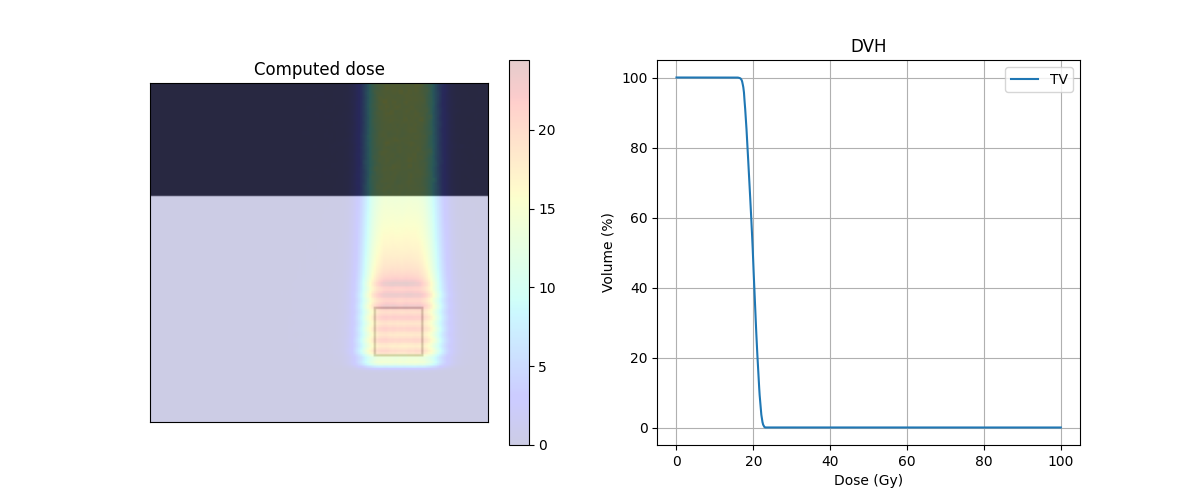
D95 = 17.159525553385418 Gy
D5 = 21.242970433728452 Gy
D5 - D95 =  4.083444880343034 Gy
Center of mass#
Here we look at the part of the 3D CT image where “stuff is happening” by getting the CoM. We use the function resampleImage3DOnImage3D to the same array size for both images.
roi = resampleImage3DOnImage3D(roi, ct)
COM_coord = roi.centerOfMass
COM_index = roi.getVoxelIndexFromPosition(COM_coord)
Z_coord = COM_index[2]

img_ct = ct.imageArray[:, :, Z_coord].transpose(1, 0)
img_mask = roi.imageArray[:, :, Z_coord].transpose(1, 0)
img_body = body.imageArray[:, :, Z_coord].transpose(1, 0)
img_dose = resampleImage3DOnImage3D(doseImage, ct)
img_dose = img_dose.imageArray[:, :, Z_coord].transpose(1, 0)
Plot of the dose#
fig, ax = plt.subplots(1, 2, figsize=(12, 5))
ax[0].axes.get_xaxis().set_visible(False)
ax[0].axes.get_yaxis().set_visible(False)
ax[0].imshow(img_ct, cmap='gray')
ax[0].contour(img_body,[0.5],colors='green')  # Body
ax[0].contour(img_mask,[0.5],colors='red')  # PTV
dose = ax[0].imshow(img_dose, cmap='jet', alpha=.2)
plt.colorbar(dose, ax=ax[0])
ax[1].plot(target_DVH.histogram[0], target_DVH.histogram[1], label=target_DVH.name,color='red')
ax[1].plot(body_DVH.histogram[0], body_DVH.histogram[1], label=body_DVH.name,color='green')
ax[1].set_xlabel("Dose (Gy)")
ax[1].set_ylabel("Volume (%)")
ax[0].set_title("Computed dose")
ax[1].set_title("DVH")
plt.grid(True)
plt.legend()
plt.savefig(os.path.join(output_path,'beamFree2.png'),format = 'png')
plt.show()
Total running time of the script: (3 minutes 20.227 seconds)