
Note
Go to the end to download the full example code.
Applying Baseline Shift#
author: OpenTPS team
This example demonstrates how to apply a baseline shift to a synthetic CT image and its corresponding tumor mask using the OpenTPS library. The example generates a synthetic 3D CT image, applies different baseline shifts, and visualizes the results.
running time: ~ 5 minutes
Setting up the environment in google collab#
import sys
if "google.colab" in sys.modules:
    from IPython import get_ipython
    get_ipython().system('git clone https://gitlab.com/openmcsquare/opentps.git')
    get_ipython().system('pip install ./opentps')

    import opentps
imports
import numpy as np
import matplotlib.pyplot as plt
import logging
import os
import the needed opentps.core packages
from opentps.core.data.images import CTImage
from opentps.core.data.images import ROIMask
from opentps.core.processing.imageProcessing.syntheticDeformation import applyBaselineShift

logger = logging.getLogger(__name__)
Output path#
output_path = os.path.join(os.getcwd(), 'Output', 'ExampleApplyBasilineShift')
if not os.path.exists(output_path):
        os.makedirs(output_path)
logger.info('Files will be stored in {}'.format(output_path))
Synthetic 4DCT generation function#
def createSynthetic3DCT(diaphragmPos = 20, targetPos = [50, 100, 35], spacing=[1, 1, 2], returnTumorMask = False):
    # GENERATE SYNTHETIC CT IMAGE
    # background
    im = np.full((170, 170, 100), -1000)
    im[20:150, 70:130, :] = 0
    # left lung
    im[30:70, 80:120, diaphragmPos:] = -800
    # right lung
    im[100:140, 80:120, diaphragmPos:] = -800
    # target
    im[targetPos[0]-5:targetPos[0]+5, targetPos[1]-5:targetPos[1]+5, targetPos[2]-5:targetPos[2]+5] = 0
    # vertebral column
    im[80:90, 95:105, :] = 800
    # rib
    im[22:26, 90:110, 46:50] = 800
    # couch
    im[:, 130:135, :] = 100
    ct = CTImage(imageArray=im, name='fixed', origin=[0, 0, 0], spacing=spacing)

    if returnTumorMask:
        mask = np.full((170, 170, 100), 0)
        mask[targetPos[0]-5:targetPos[0]+5, targetPos[1]-5:targetPos[1]+5, targetPos[2]-5:targetPos[2]+5] = 1
        roi = ROIMask(imageArray=mask, origin=[0, 0, 0], spacing=spacing)

        return ct, roi

    else:
        return ct
GENERATE SYNTHETIC CT IMAGE AND TUMOR MASK#
ct, roi = createSynthetic3DCT(returnTumorMask=True) # roi = [45, 54], [95, 104], [30, 39]
APPLY BASELINE SHIFT#
ctDef1, maskDef1 = applyBaselineShift(ct, roi, [4, 4, 4])
ctDef2, maskDef2 = applyBaselineShift(ct, roi, [-4, -4, -4])
ctDef3, maskDef3 = applyBaselineShift(ct, roi, [0, 0, -16])
CHECK RESULTS#
assert (np.all(ctDef1.imageArray[50:57, 100:107, 36:42] > -700)), f"Error for baseline shift +4,+4,+4"
assert (np.all(ctDef2.imageArray[42:49, 92:99, 28:34] > -700)), f"Error for baseline shift -4,-4,-4"
assert (np.all(ctDef3.imageArray[46:53, 96:103, 22:32] > -700)), f"Error for baseline shift 0,0,-16"
DISPLAY RESULTS#
fig, ax = plt.subplots(2, 4)
fig.tight_layout()
y_slice = 100
z_slice = 35 #round(ct.imageArray.shape[2] / 2) - 1
ax[0,0].imshow(ct.imageArray[:, y_slice, :].T[::-1, ::1], cmap='gray', origin='upper', vmin=-1000, vmax=1000)
ax[0,0].title.set_text('CT')
ax[0,1].imshow(ctDef1.imageArray[:, y_slice, :].T[::-1, ::1], cmap='gray', origin='upper', vmin=-1000, vmax=1000)
ax[0,1].title.set_text('baseline shift 4,4,4')
ax[0,2].imshow(ctDef2.imageArray[:, y_slice, :].T[::-1, ::1], cmap='gray', origin='upper', vmin=-1000, vmax=1000)
ax[0,2].title.set_text('baseline shift -4,-4,-4')
ax[0,3].imshow(ctDef3.imageArray[:, y_slice, :].T[::-1, ::1], cmap='gray', origin='upper', vmin=-1000, vmax=1000)
ax[0,3].title.set_text('baseline shift 0,0,-16')

ax[1,0].imshow(ct.imageArray[:, :, z_slice].T[::1, ::1], cmap='gray', origin='upper', vmin=-1000, vmax=1000)
ax[1,0].title.set_text('CT')
ax[1,1].imshow(ctDef1.imageArray[:, :, z_slice].T[::1, ::1], cmap='gray', origin='upper', vmin=-1000, vmax=1000)
ax[1,1].title.set_text('baseline shift 4,4,4')
ax[1,2].imshow(ctDef2.imageArray[:, :, z_slice].T[::1, ::1], cmap='gray', origin='upper', vmin=-1000, vmax=1000)
ax[1,2].title.set_text('baseline shift -4,-4,-4')
ax[1,3].imshow(ctDef3.imageArray[:, :, z_slice].T[::1, ::1], cmap='gray', origin='upper', vmin=-1000, vmax=1000)
ax[1,3].title.set_text('baseline shift 0,0,-16')

plt.savefig(os.path.join(output_path, 'ExampleApplyBaselinesShift.png'))
print('Baseline shift example completed')
plt.show()
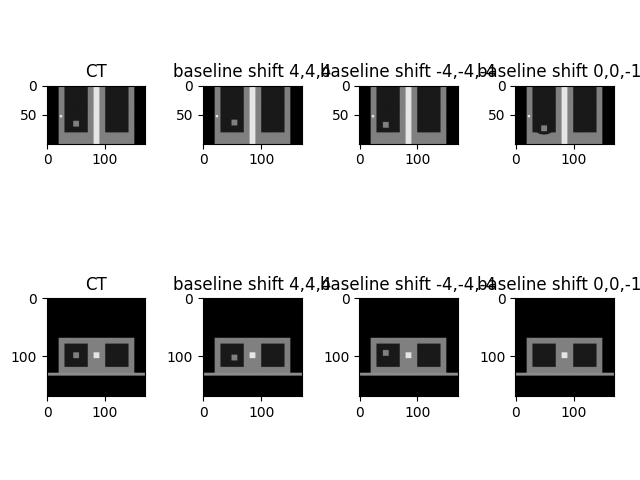
Baseline shift example completed
Total running time of the script: (0 minutes 7.820 seconds)